
Single-Page String List
The single-page string list shows every translatable string on one page as a list, with the original and your translation side by side. It’s the focused, list-based counterpart to the Visual Editor — same page, no live preview — and a narrower view than the whole-site Full Text List.
Opening it from the Sitemap
Section titled “Opening it from the Sitemap”The Sitemap (the default view on the Translation screen) lists every page on your site with its word count, an Auto Translate toggle, and translation progress per language. Click a page to open its string list; a breadcrumb takes you back to the Sitemap.
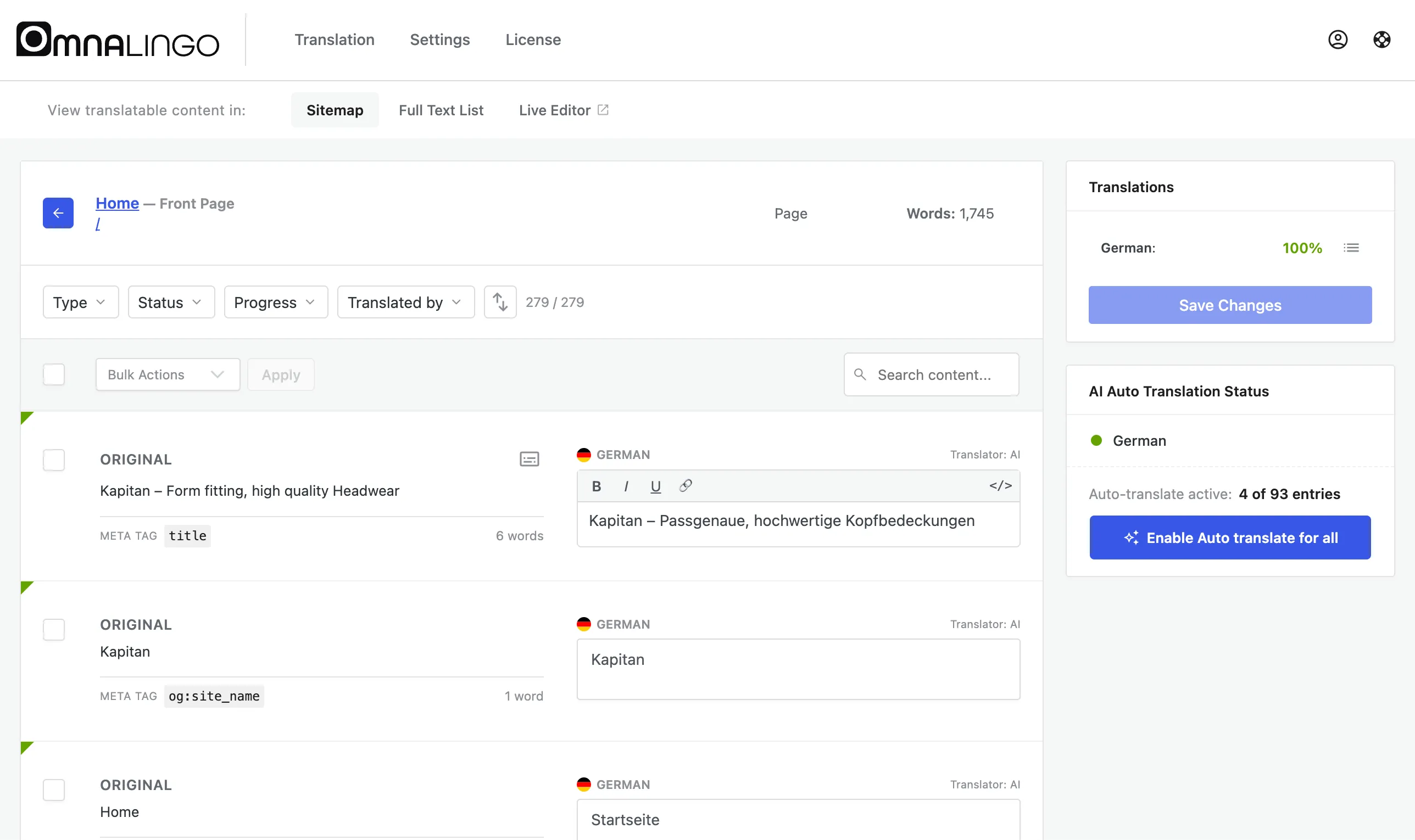
What you see
Section titled “What you see”Each row shows the ORIGINAL text and the editable translation, with the same controls as the Full Text List:
- A type label (Content,
title, a meta tag, a select option, …) and word count. - A Translator: AI / Human indicator.
- An inline plain-text or rich-text editor.
Search, the Type / Status / Progress / Translated by filters, and Bulk Actions all work within the page. The right-hand panel shows that page’s translation progress and lets you save your changes.
When to use it
Section titled “When to use it”- Working through a single page top to bottom without the live preview.
- Reviewing or fixing a page’s SEO strings (title, meta description, social tags).
- Quickly checking what’s left to translate on one page.
To translate everything on the page at once, turn on Auto Translate for it from the Sitemap, or use Translate the entire page with AI in the Visual Editor. See also Translating Your Site.