
Installation
System Requirements
Section titled “System Requirements”| Requirement | Minimum version |
|---|---|
| WordPress | 7.0 |
| PHP | 7.4 |
| MySQL | 5.7 |
| MariaDB | 10.3 (alternative to MySQL) |
If you are on an older PHP version, update it before installing — the plugin will not activate on unsupported versions.
Install via WordPress Admin
Section titled “Install via WordPress Admin”-
Download the
omnalingo.zipfile from omnalingo.com. -
In your WordPress admin, go to Plugins → Add New → Upload Plugin.
-
Click Choose File, select
omnalingo.zip, then click Install Now. -
When the upload finishes, click Activate Plugin.
After activation, the Omnalingo setup wizard opens, and an Omnalingo item appears in the admin sidebar.
Install via FTP
Section titled “Install via FTP”-
Unzip
omnalingo.zipon your computer. -
Upload the resulting
omnalingofolder to/wp-content/plugins/on your server. -
In Plugins, click Activate next to Omnalingo.
What Happens After Activation
Section titled “What Happens After Activation”When the plugin activates, it:
- Creates its database tables to store your URL index, scanned strings, and translations.
- Registers the URL rules that make language-prefixed addresses like
/fr/about/work.
None of your existing content is touched.
Set Up With the Wizard (recommended)
Section titled “Set Up With the Wizard (recommended)”The easiest path is the setup wizard that opens after activation. It walks you through choosing your languages, picking which content gets translated, and connecting your free Omnalingo API key — in a couple of minutes.
You can re-run the wizard any time from Omnalingo → Settings → General.
Prefer to do it by hand? The next two sections cover the same steps manually.
Set Up Manually
Section titled “Set Up Manually”1. Add your languages and content
Section titled “1. Add your languages and content”-
Go to Omnalingo → Settings → General.
-
Under Language Settings, click Add Language, pick a language, set its URL slug (e.g.
de), and toggle it Active. -
Under Sitemap Content Settings, choose which content types are translated — the Smart default preset works for most sites, or select types manually.
-
Click Save All Changes.
2. Connect your Omnalingo API key
Section titled “2. Connect your Omnalingo API key”Omnalingo’s AI runs through a single key you generate in the plugin. You do not need an external AI account — no OpenAI, Gemini, or Claude credentials. The only key you need is your own Omnalingo API key.
-
Go to Omnalingo → Settings → License.
-
Under One Click Setup to get a free Omnalingo API Key, click Connect to Omnalingo. This generates a free key and connects your site instantly — no account, no credit card.
-
Already have a key (for example after subscribing)? Paste it under Enter an existing key manually and click Save instead.
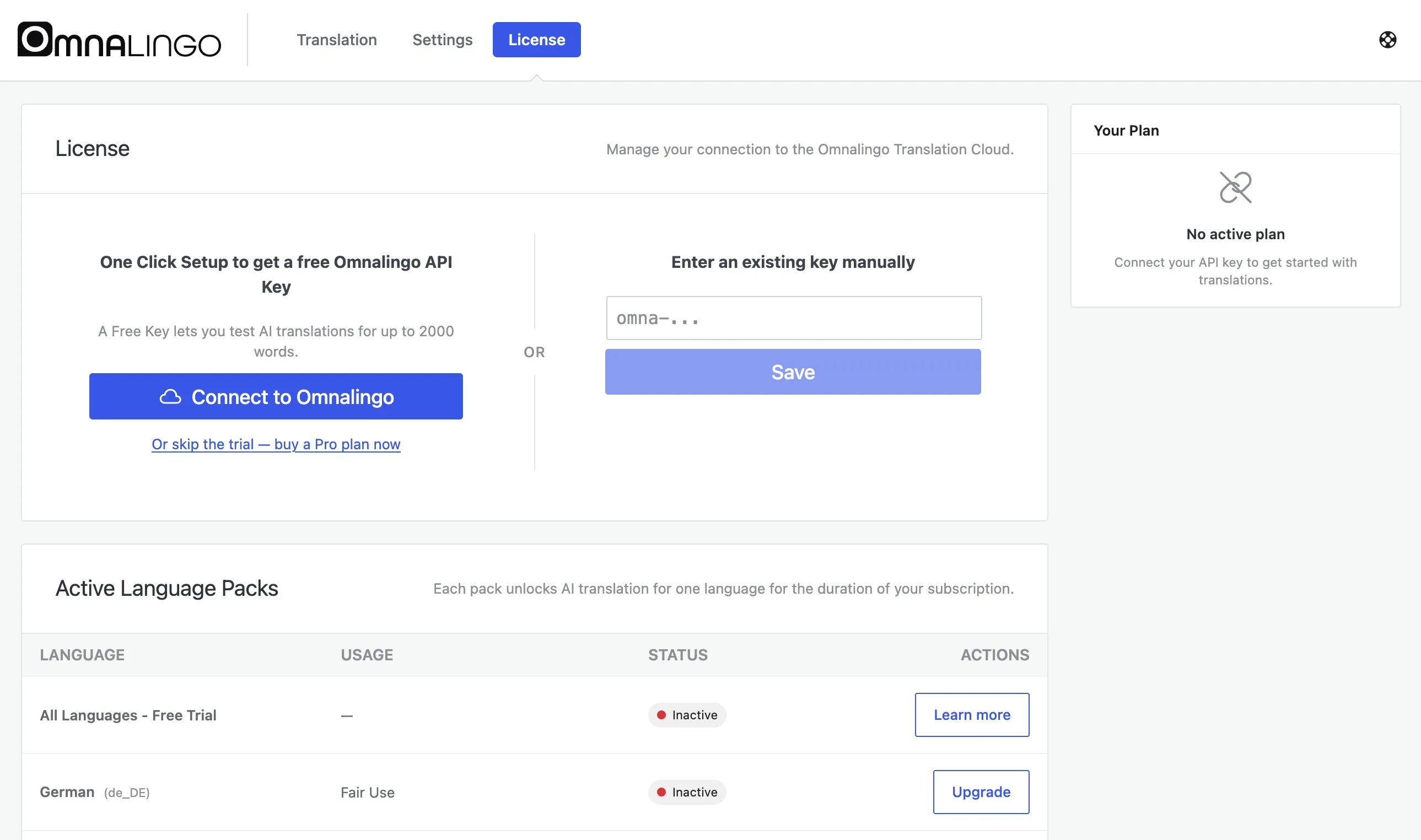
The free key lets you test AI translation for up to 2,000 words. Manual editing is always unlimited, in as many languages as you like.
To have the AI translate at scale and keep your site current as you publish, subscribe to the AI Translation Service (€8/month, billed yearly). It includes one language activation — full AI translation for one language of your choice, with a generous yearly allowance that virtually every site stays comfortably under. Further languages are €29 each, paid once.
Without a connected key:
- AI translation is unavailable.
- Manual translation in the Live Editor still works.
- Your content is still listed and word-counted in the Sitemap.
Verify the Installation
Section titled “Verify the Installation”Open Omnalingo → Translation. You should see:
- The Sitemap listing your pages with their word counts.
- Your target language in the translation progress column.
- The Live Editor and Full Text List tabs alongside the Sitemap.
If something looks off:
| Symptom | What to check |
|---|---|
| The screen doesn’t load | Deactivate and reactivate the plugin to re-run the database setup |
| ”403 Forbidden” in the admin | A security plugin may be blocking Omnalingo’s internal API — allow the omnalingo/v1/ path |
| No languages available | Go to Settings → General → Language Settings and confirm a target language was saved and set Active |
Next Steps
Section titled “Next Steps”With the plugin installed and set up, follow the Quick Start guide to translate your first page and see it live.