
Your Key & Sites
The plugin itself needs no key and no account — you can install it on as many sites as you like and translate by hand. A key is only needed for the AI Translation Service, and it is managed on the License screen (Omnalingo → License).
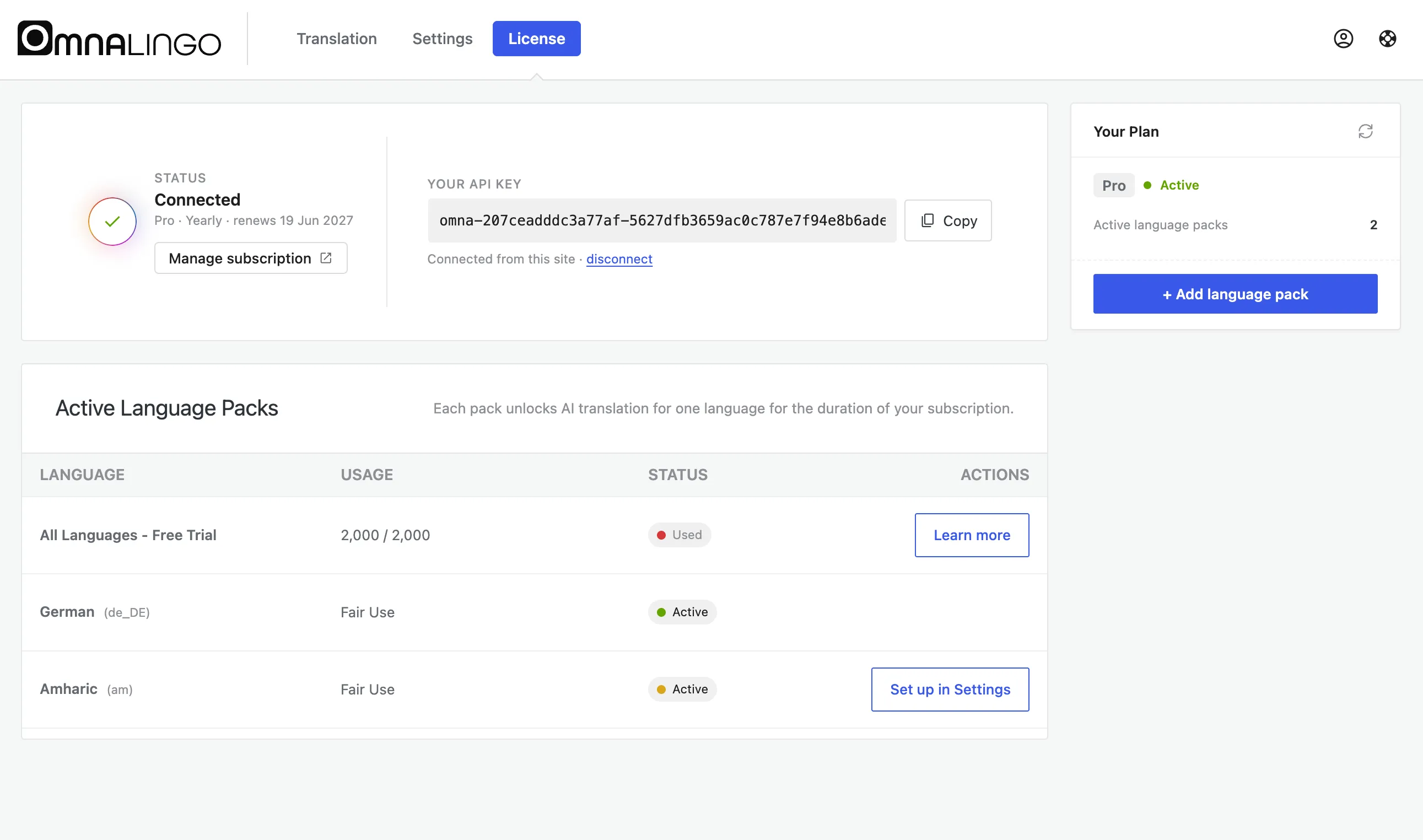
Managing your key
Section titled “Managing your key”- Status shows whether you’re Connected, your plan, and your renewal date.
- Your API key is shown with a Copy button; disconnect unlinks this site.
- Manage subscription opens your subscription (billing, renewals) in Stripe.
- Your Plan shows how many languages you have activated, and lets you activate another.
- The Refresh icon pulls the latest plan data — use it if an AI feature isn’t active yet after subscribing or renewing.
One subscription = one site
Section titled “One subscription = one site”The free plugin has no site limit. A subscription covers one site, and a site is defined by its domain. If you run separate sites on separate domains, each needs its own subscription. (Running an agency or need several? Get in touch about bulk pricing.)
Staging and local development
Section titled “Staging and local development”Keys are tied to domains, but standard development environments don’t count as separate sites: localhost, .local, and common staging subdomains are covered by your production subscription. So you can build and test without paying twice.
Multisite
Section titled “Multisite”Because this is by domain, subsites on the same domain — for example
domain.com/siteA and domain.com/siteB — can share one key. See
WordPress Multisite for setup.