TranslatePress popularized on-page visual editing for WordPress, and it remains a solid, well-established choice, especially for simple sites. Omnalingo takes a different path: a free plugin with every feature and unlimited languages, a sitemap-style overview of all your pages, and premium AI translation as a separate flat-fee service. On pure plugin cost, TranslatePress Personal (€99 a year) and Omnalingo with AI for two extra languages (about €413 over four years) land in the same range; the differences are in workflow, AI approach, and what you pay for.
Back in 2017, translating a WordPress website was notoriously frustrating. Plugins like WPML forced site owners to manage duplicate database posts for every language and hunt down lost strings inside complex backend menus. When TranslatePress launched with its visual frontend editor, it felt like a breath of fresh air. Instead of navigating endless admin tables, creators could browse their website and translate text directly on the screen.
TranslatePress earned widespread popularity for good reason. For small business websites that need a handful of languages, it is an accessible tool. Since then, the landscape has changed: modern websites rely on dynamic query loops and full-site editing, and AI language models can now translate with far more context than classic machine translation.
In this honest comparison, we will look at how both plugins handle feature access, visual editing, AI translation, and long-term cost, and where TranslatePress is the better fit.
The Core Architectural Differences Between Both Plugins
Before examining specific features, it helps to understand how both plugins approach localization. How a plugin parses your content shapes your workflow and your ongoing costs.
TranslatePress works on the final HTML output of your WordPress site. It extracts text strings, stores them in a dictionary table in your MySQL database, and swaps in translated text. This approach lets it translate content from themes, shortcodes, and page builders without custom integrations.
Omnalingo also translates rendered output and stores translations in its own tables in your WordPress database. Original posts are not duplicated. Translation is done upfront rather than on request, with an official added load time of under 25ms. The difference lies in how translation is managed: Omnalingo organises everything around a sitemap of your pages and pairs it with a page-aware AI service.
Free Versions and Paid Plans Compared
Both plugins offer a free entry point, but their licensing models differ. Omnalingo’s free plugin has every feature, unlimited languages and unlimited sites, with no account needed. Only AI translation is a paid service.
TranslatePress offers a free plugin on WordPress.org with these limits:
- One extra language: The free version is limited to one additional language. More languages require a paid plan (every paid plan includes unlimited languages).
- Slugs and SEO fields in the SEO Pack: Translating URL slugs and SEO title and description requires the SEO Pack, which is included from the Personal plan (€99/year) upwards.
- Browse as user role: Browsing and translating your site as a specific user role requires the Business plan (€199/year).
- TranslatePress AI: TranslatePress offers its own AI translation, with 2,000 free words to try it and AI word allowances of roughly 50,000 to 500,000 words per year on paid plans, depending on the plan. You can also connect other machine translation providers.
TranslatePress plans (billed yearly, excl. VAT) are Personal €99, Business €199, and Developer €349.
Omnalingo’s approach: the plugin is free with unlimited languages, the visual editor, content list, sitemap, translated URLs, hreflang sitemaps, XLIFF 1.2 import and export, and a translator role. The paid AI Translation Service (€96 a year excl. VAT, one AI language included, extra AI languages €39 once, currently €29) adds premium AI, a Glossary, voice and formality control, bulk translate, and re-translation on edit. Manual translation never needs the paid service.
Visual Editing Workflows Compared
TranslatePress built its reputation on the visual editor. When you click “Translate Page”, it loads your website next to a sidebar in which you pick a text on the page and edit its translation.
Both plugins offer a sidebar-plus-page editor. Where the day-to-day experience can differ:
- Editing and saving: Both editors save explicitly. In Omnalingo you edit with a live preview and then click Save Changes (there is no autosave). Try both on a real page to compare how the workflow feels.
- Dynamic and JavaScript content: Text that only appears after a click or a delay (sliders, tabs, popups) has to be displayed in the editor before it can be translated, in either plugin. In Omnalingo, a front-end observer swaps text that is already in the translation map; new JS strings must be captured once through a page scan or the Live Editor.
- Repeating patterns: Strings like “12 reviews” or “Page 2 of 400” differ only by a number. Omnalingo’s Pattern Manager groups such strings with variables (like “{number1} reviews”), so you translate the pattern once instead of every variation.
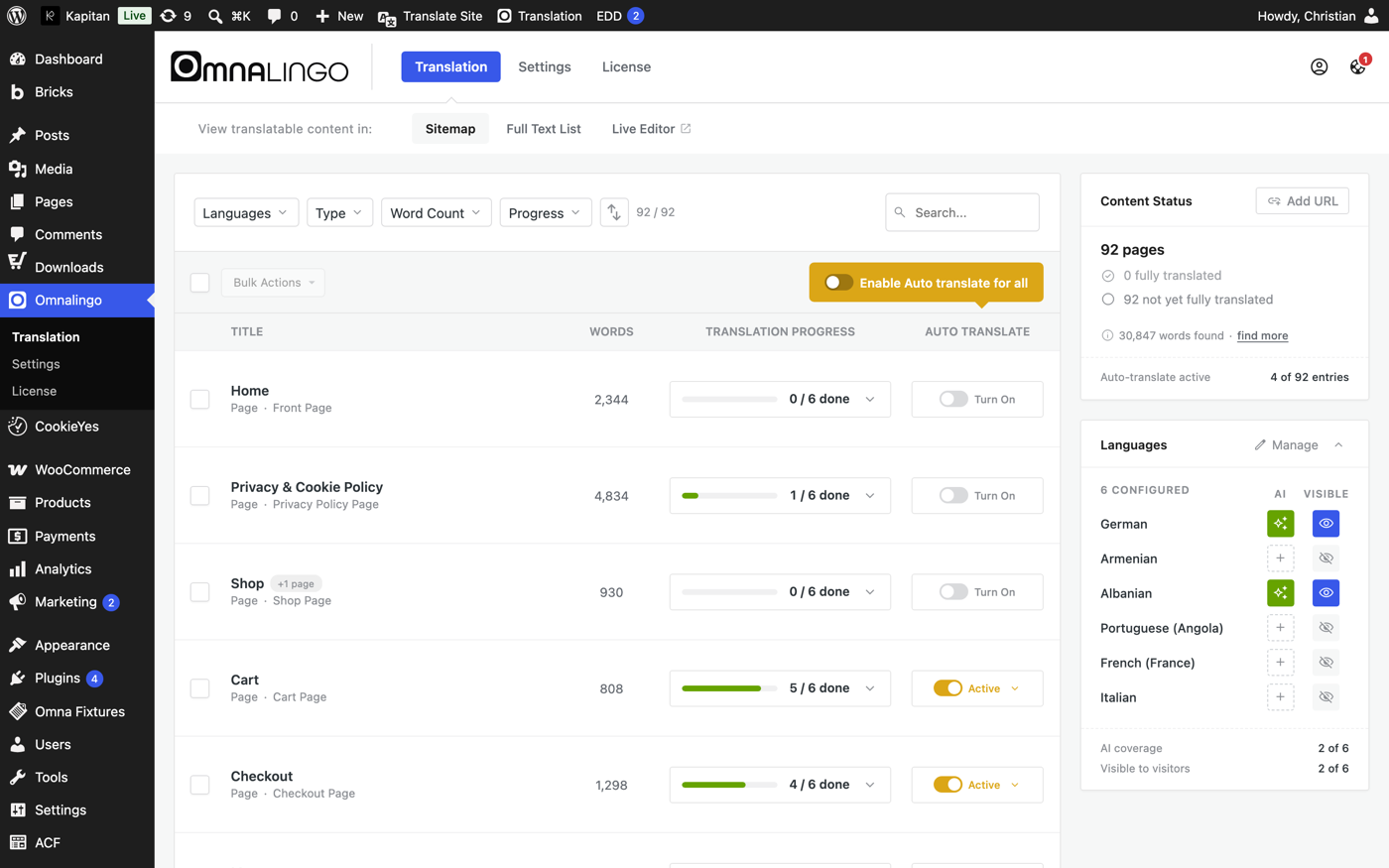
- Finding every page: In Omnalingo, Translation → Sitemap lists your pages with per-language progress, so you can see what is left. With a purely on-page workflow you visit each page to translate it.
The Omnalingo Live Editor opens through the front end while you are logged in, and shows a live preview of the translated page as you edit.

Clicking an element opens its translation field, where you can refine the wording yourself or trigger an AI translation (with the AI Translation Service). You can check line wrapping and mobile layouts in the preview before saving.
Sitemap Overview Versus a Long Strings Table
Another difference shows when managing theme strings, plugin labels, and form notices. How a plugin surfaces non-post content determines how manageable it feels.
In TranslatePress, non-content strings are found under the “String Translation” tab. Its “Gettext” subtab shows a paginated table of system strings extracted from your theme and active plugins.
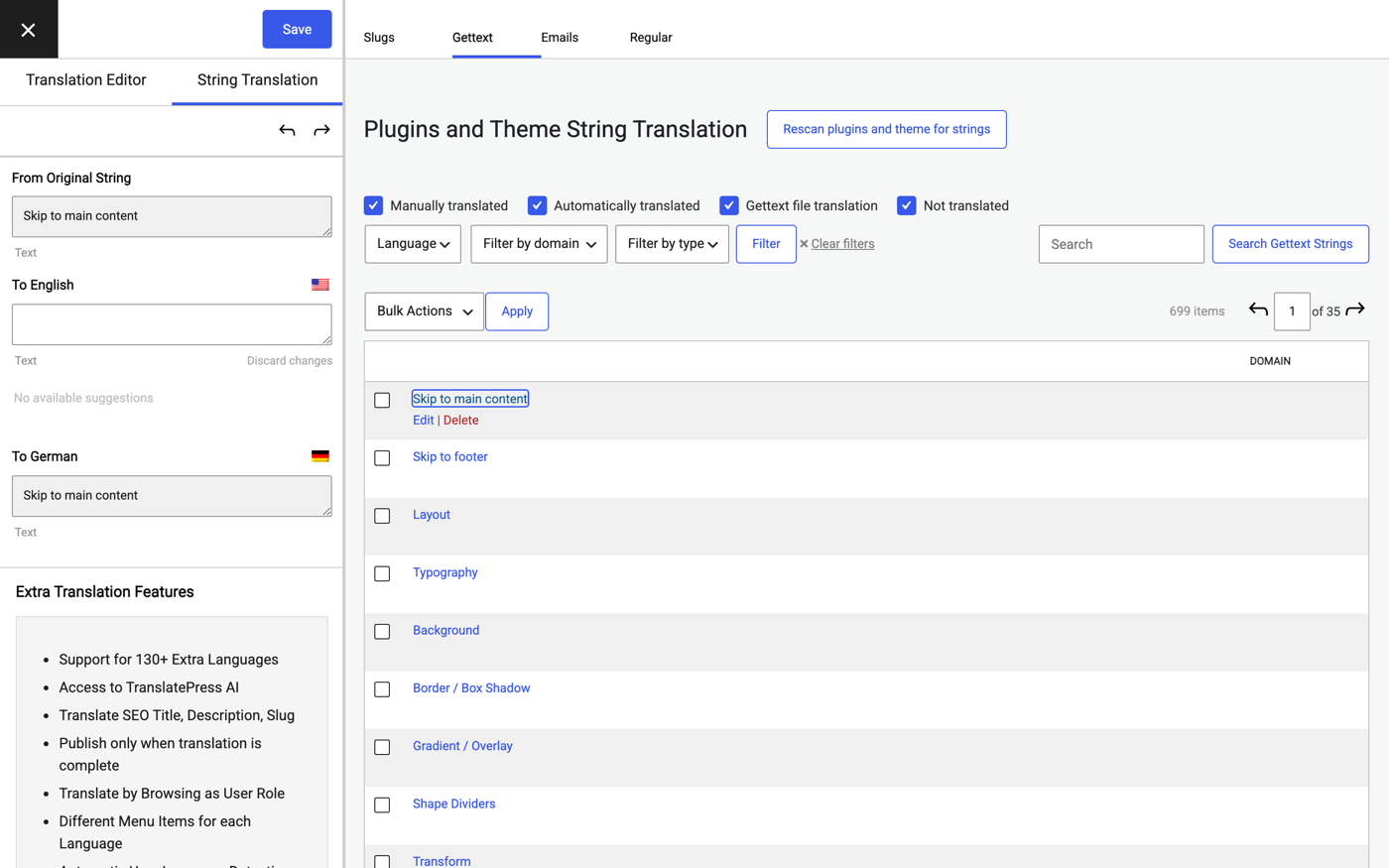
On our test site, that list had 699 items across 35 screens, mixing buttons with theme settings labels such as “Layout”, “Typography”, and “Border / Box Shadow”. For a large site, a flat list like this can feel overwhelming when you try to find what matters.
Omnalingo offers two views instead. The Sitemap groups your content by page with progress per language, and the Full Text List shows every string, which you can filter by type (including “Theme & Plugin”):
- Page progress: See completion per page and language at a glance.
- Enable Auto translate for all: With the AI Translation Service (or the free trial words), one sidebar button turns on automatic translation for all pages, or you can switch pages on one by one.
- Filtering by type: The Full Text List lets you filter to theme and plugin strings when you want to work through them.
Machine Translation Versus Page-Aware AI
Automated translation has evolved quickly. Classic machine translation engines such as Google Translate and DeepL typically translate text in short segments, which can lose context. Modern AI language models can take more of the page into account.
TranslatePress supports automatic translation through Google Translate and DeepL, and offers TranslatePress AI as well (2,000 free words to try; allowances of about 50,000 to 500,000 AI words per year on paid plans). Its AI words are a metered allowance.
Omnalingo’s AI Translation Service uses modern AI language models that look at the whole page. It is priced flat rather than per word: there is no word meter, and publishing more does not cost more. Each AI language has a fair-use ceiling of 1,000,000 AI words per year (about Shakespeare’s complete works), which almost no site comes close to; if yours does, contact us.
What that gives you in practice:
- Context awareness: A word like “Book” can be a noun in a library catalog or a verb on a reservation button; a page-aware model can tell the difference from the surrounding page.
- Voice and formality control: Choose a site-wide writing voice (Balanced, Playful, Conversational, Polished) and set formal or informal address (du/Sie) per language.
- Glossary: “Never translate” and “Always translate as” rules for brand names and key terms, per language.
For a fuller look at machine translation versus AI models, see LLM vs machine translation quality. No translation tool is perfect, so plan for a human review of important pages either way.
How Translation Blocks and HTML Strings Appear
TranslatePress documents a feature called “Translation Blocks”, which groups a larger section of HTML into one translatable unit so that sentences containing inline tags (like bold text or links) stay together. This is a reasonable way to keep a sentence intact.
The side effect is that some dictionary entries contain markup. As an illustrative example (not taken from your site), an entry for a slider caption could look like this:
<h2 class="avia-caption-title">Welcome to Dr. Smith</h2><p>Your trusted family dental clinic</p><a href="/about/" class="btn">Learn More</a>Entries like this can mean translators work around tags and links, and a mistake with a closing tag can affect the layout. How often you meet such entries depends on your theme and builder, so check a few of your own pages when evaluating any plugin.
Omnalingo splits content into text strings and keeps container tags and link targets in your template structure, so translators mainly handle readable text. As with any rendered-output approach, inline formatting inside a sentence still needs a quick check in the preview.
Database Storage and Speed
Both plugins store translations in your own WordPress database and do not duplicate posts. Speed depends on your host, caching, and theme, and we have not benchmarked TranslatePress, so we make no head-to-head claims. For Omnalingo, our official figure is under 25ms of added load time, with translation done upfront instead of on request. If speed is critical for you, test both on a copy of your site.
Curious how licensing costs compare over time? Explore our interactive Translation Plugin Cost Comparison Calculator to test different scenarios: adjust your word counts, target languages, and renewal horizon to compare 1-year and 4-year expenses across TranslatePress, WPML, Weglot, and Omnalingo.
Four Year Cost Breakdown for a Realistic Scenario
Assumptions: a business website with 40,000 words translated into two additional languages (German and French), prices excl. VAT. We assume TranslatePress Personal is enough, since every paid plan includes unlimited languages and the SEO Pack, and that its AI word allowance (or your own machine translation provider) covers the initial roughly 80,000 translated words; check your plan’s allowance, as AI words are metered and top-ups would add cost. For Omnalingo we show two cases: manual translation only, and AI translation for both languages.
| Timeline | TranslatePress Personal | Omnalingo: manual only | Omnalingo: AI for 2 languages |
|---|---|---|---|
| Year 1 | €99 | €0 | €125 (€96 service + €29 extra AI language, launch price) |
| Year 2 | €99 renewal | €0 | €96 |
| Year 3 | €99 renewal | €0 | €96 |
| Year 4 | €99 renewal | €0 | €96 |
| 4-Year Total | €396 | €0 | €413 (€423 at the regular €39) |
The honest summary: if AI is part of your plan, the two come out at a similar cost, and TranslatePress Personal is slightly cheaper on paper in this scenario. The difference is what the money buys. TranslatePress charges for the plugin (and its AI words are a metered allowance), while Omnalingo’s plugin is free and you pay a flat fee only for the AI service, with no word meter. If you translate manually, Omnalingo is free; TranslatePress’s free version is limited to one extra language. If you need the TranslatePress Business plan (for browse-as-user-role, €199 a year), four years cost €796.
When TranslatePress Remains a Sensible Choice
We believe in honest recommendations. TranslatePress has earned its place as one of the most widely used translation plugins in WordPress, and there are scenarios where it is a sensible option:
- Small brochure sites needing one language: If you run a 5-page local website and only want to translate it manually into Spanish, the free version of TranslatePress is functional and easy to set up.
- Point-and-click preference: If you have no interest in sitemaps or automated pipelines and simply want to click on a sentence and type its replacement, TranslatePress offers a familiar interface.
- Established sites that work well: If your site has run smoothly on TranslatePress for years, migrating may not be an immediate priority.
If you manage a growing site, want unlimited languages without a license, or want flat-fee page-aware AI with a glossary and voice control, Omnalingo is worth a look.
Frequently Asked Questions About TranslatePress and Omnalingo
Can I translate slugs with free TranslatePress?
Translating slugs requires the SEO Pack. The SEO Pack (slugs, SEO title and description) is included from the Personal plan (€99 per year). Omnalingo translates URLs with its free plugin: use Translate URL per page and language (with a live preview and an AI suggestion), or the bulk action. It needs pretty permalinks.
How do both plugins handle database size?
Both store translations in your WordPress database. Omnalingo keeps them in its own tables and does not duplicate posts. We have not benchmarked TranslatePress, so we do not claim speed differences; test on your own site.
Does TranslatePress support AI translation?
Yes. TranslatePress supports Google Translate and DeepL, and has its own TranslatePress AI (2,000 free words, and roughly 50,000 to 500,000 AI words per year on paid plans). Omnalingo’s AI Translation Service is a flat €96 a year with page-aware AI, a Glossary, and voice and formality control.
Can I translate my entire site automatically?
Yes, with Omnalingo’s AI Translation Service. From Translation → Sitemap, “Enable Auto translate for all” turns on automatic translation for your pages, and edits are re-translated. You can also start with the 2,000 free AI words, or translate manually for free.
Ready to try Omnalingo? Get the free plugin today or explore our WordPress translation cost guide to compare your options.