Weglot is a polished, cloud-based translation service, but its yearly plans are tied to a word count, so the price climbs as your site grows. If you run a multi-platform company with sites on Webflow, Shopify, and WordPress, Weglot provides turnkey translation under one dashboard. If you run WordPress only, Omnalingo keeps your translations in your own database and charges a flat AI fee that does not depend on how many words you publish.
If you search for WordPress translation solutions today, Weglot is almost certainly one of the first names you will encounter. Founded in 2016, Weglot pioneered a frictionless approach to website localization: install a plugin, choose your languages, and watch your site appear in multiple languages within minutes. For teams that want translation without ever dealing with WordPress database tables, template files, or server configurations, Weglot feels like pure magic.
Yet as many agency owners, e-commerce managers, and bloggers eventually discover, that convenience comes with long-term tradeoffs. Weglot keeps your translations on its own servers, and its plans are capped by the number of words it translates for you. Every language adds to that count, and if you stop paying, the plugin’s WordPress.org listing states that your site will no longer be translated.
We built Omnalingo to provide a different path for WordPress creators. Instead of keeping your translations with a remote cloud service, Omnalingo translates your content with modern AI language models and saves the results inside your own WordPress database. In this comparison, we will look at the architectural differences, break down the 4-year cost with explicit assumptions, and help you decide which tool matches your business goals.
Cloud-Hosted Translations Versus Your Own Database
To understand the difference between Weglot and Omnalingo, you first have to understand where your translations live. Where a translation tool stores its data shapes your ongoing costs and your independence.
Weglot is a cloud service. Its WordPress plugin translates your pages at the source-code level, and the translated text itself is stored on Weglot’s servers, not in your WordPress database. Your translations stay available to you as long as your plan is active, and Weglot lets you export them.
That model delivers real convenience during setup, but it comes with tradeoffs worth knowing:
- Dependence on the vendor: Because your translations live on Weglot’s infrastructure, they are not in standard WordPress tables. You can export them, but you need to do that before you leave and then import them somewhere else.
- What happens if you stop paying: Weglot’s WordPress.org listing says that without an active plan your site will no longer be translated. Your translations stay on Weglot’s servers, but your visitors stop seeing them on your site.
- A third-party service in the loop: Translation data and the translation process depend on an external service, so planning around its pricing and availability is part of owning the site.
Omnalingo takes the opposite approach: your translations live in your own database. When Omnalingo translates a page, the result is written into Omnalingo’s own tables in your WordPress database. Original posts are not duplicated, and the translated page is served from your own server. (Read Omnalingo vs WPML to see how this compares with another storage architecture.) Omnalingo is also translated upfront rather than on request, with an official added load time of under 25ms.
If you ever stop paying for the AI Translation Service, your existing translations stay in your database and keep being served as long as the plugin is installed. The free plugin and the visual editor keep working, so you can keep editing manually. You only need the paid service when you want AI to translate new content for you.
The Math Problem: Why Word-Count Plans Add Up
The biggest friction point for many site owners is not the software itself; it is the pricing structure. Weglot’s yearly price depends on the word limit and number of languages you need, and the words it translates are counted across all your languages.
Here are Weglot’s public plans as of October 2026, billed annually and excluding VAT:
- Free (€0): 2,000 words, 1 language. Good for trying it out.
- Starter (€150/year): 10,000 words, 1 language.
- Business (€290/year): 50,000 words, up to 3 languages.
- Pro (€790/year): 200,000 words, up to 5 languages (also offered at €79 per month on monthly billing).
- Advanced (€2,990/year): 1,000,000 words, up to 10 languages.
- Extended (€6,990/year): 5,000,000 words, up to 20 languages.
- Enterprise: custom pricing.
Why does this matter over time? Because website content only grows, while a plan’s word limit is fixed. As you add blog posts, publish product updates, and expand your catalog, your word count creeps upward. Crossing a limit means moving to the next plan, and the jump between plans can be large (from Pro at €790 to Advanced at €2,990 a year).
4-Year Cost Breakdown: Omnalingo Versus Weglot Compared
To see how these two pricing models diverge, let us run numbers for a standard WordPress site. Assumptions: 50,000 original words (around 40 pages and 30 blog posts), translated into two additional languages (German and Spanish). We count words the way we understand Weglot’s plans to work, as translated words across languages: 50,000 x 2 = 100,000 words, which fits Weglot’s Pro plan (200,000 words, 5 languages). For Omnalingo we assume you use AI translation for both languages. All prices exclude VAT.
| Timeline | Weglot (Pro plan) | Omnalingo (free plugin + AI Translation Service, 2 AI languages) |
|---|---|---|
| Year 1 | €790 | €125 (€96 service incl. 1 AI language + €29 extra AI language, launch price) |
| Year 2 | €790 renewal | €96 service renewal |
| Year 3 | €790 renewal | €96 service renewal |
| Year 4 | €790 renewal | €96 service renewal |
| 4-Year Total | €3,160 | €413 (€423 at the regular €39 for the extra language) |
Over four years, Weglot costs €3,160 compared to €413 for Omnalingo, a difference of roughly €2,750 for the same website. Weglot counts translated words, so 50,000 words in two languages count as 100,000 (Weglot’s own example: 8,000 words in three languages are 24,000 translated words), which is beyond Business and lands on Pro.
Now suppose the site grows to 250,000 words in 3 languages. Counted as translated words across languages, that is 250,000 x 3 = 750,000 words, which no longer fits Pro (200,000 words) and needs Advanced at €2,990 a year: 4 x €2,990 = €11,960 over four years. (Even if only the 250,000 source words were counted, that would still exceed Pro and require Advanced.) On the Omnalingo side, three AI languages cost €96 x 4 + 2 x €29 = €442 over four years at the launch price.
With Omnalingo, the plugin itself is free with every feature, unlimited languages, and unlimited sites. The AI Translation Service costs €96 a year (excl. VAT) and includes one AI language; each extra AI language is a one-time purchase (€39, currently €29 at launch) with no recurring fee. There is no word meter: publishing more does not cost more. (As a fair-use ceiling, each AI language is capped at 1,000,000 AI words per year, about Shakespeare’s complete works, and almost no site comes close.) See our detailed breakdown of what multilingual WordPress actually costs for more scenarios.
Want to compare costs across the whole ecosystem? Test our interactive Translation Plugin Cost Comparison Calculator to model different scenarios: adjust your site word counts, target languages, and renewal horizon to compare 1-year and 4-year expenses across Weglot, WPML, TranslatePress, and Omnalingo.
Performance and SEO: Translated Upfront
Search engines and human visitors both reward fast pages. How a translation tool delivers its HTML influences speed and indexing reliability.
Omnalingo translates your content upfront rather than on request, and there is no proxy, no DNS change, and no external rendering service. Our official figure is under 25ms of added load time. Because translated text is stored in your local database, your server delivers the finished localized page directly. The HTML delivered to Googlebot and human visitors already contains the translated text.
Omnalingo also generates search-engine-ready subdirectory URLs (like example.com/de/ and example.com/es/) with reciprocal hreflang tags, including x-default, rendered in the <head> element. (For a deep dive into international technical SEO, read our guide on how hreflang works on WordPress).
Editing and Quality Inside WordPress
Automated AI translation has advanced by leaps and bounds over the past two years. However, high-converting websites still benefit from human fine-tuning for brand slogans, industry terms, and legal disclaimers.
In Weglot, you manage translations through Weglot’s own dashboard and its visual editor. That works well, but your editing happens on their platform rather than inside your familiar WordPress admin.
Omnalingo keeps your editorial workflow inside WordPress:
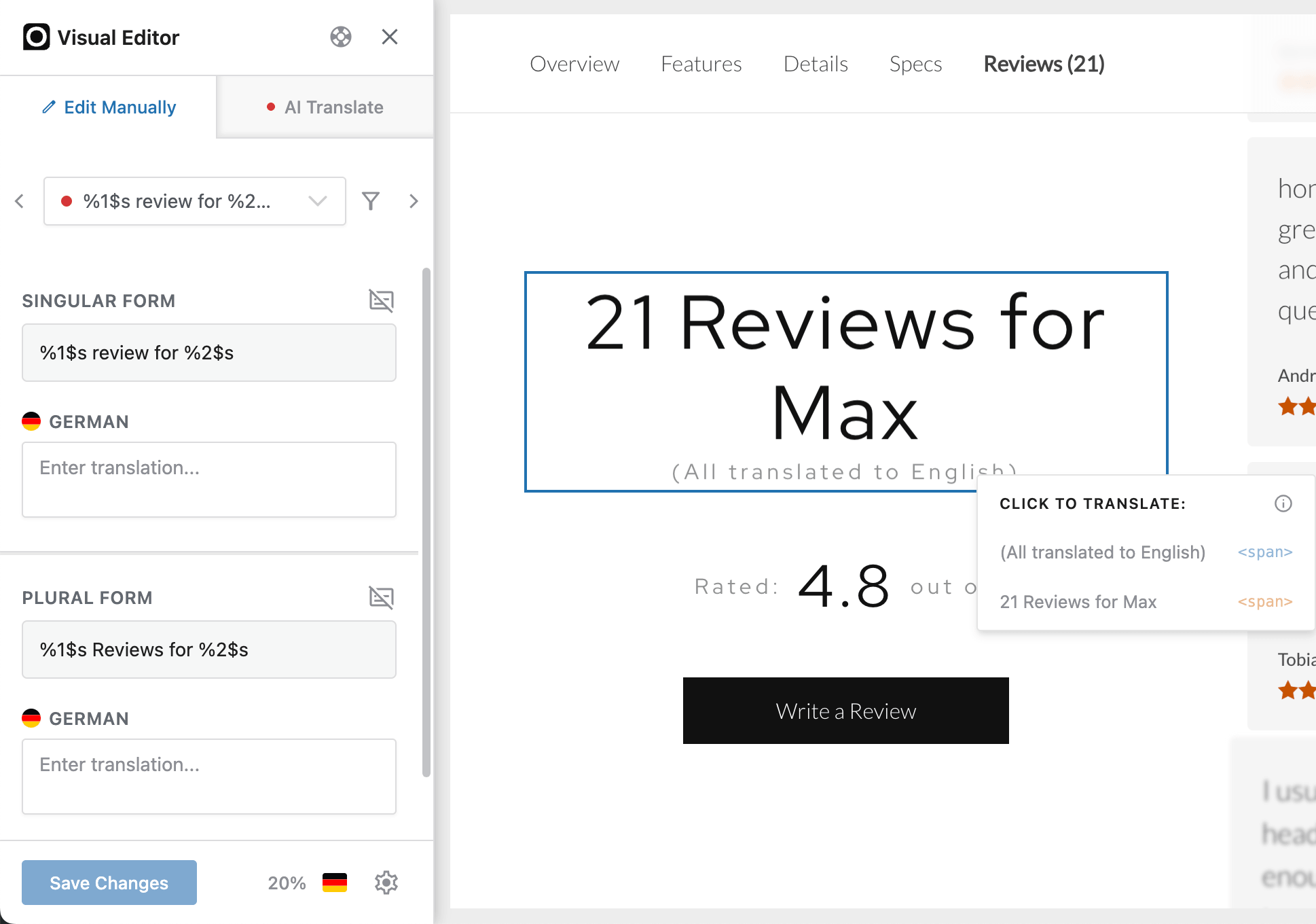
- Frontend Live Editor: Browse your localized website like a visitor. Click on any headline, button, or paragraph to edit translated copy on the spot with a live preview, then click Save Changes.
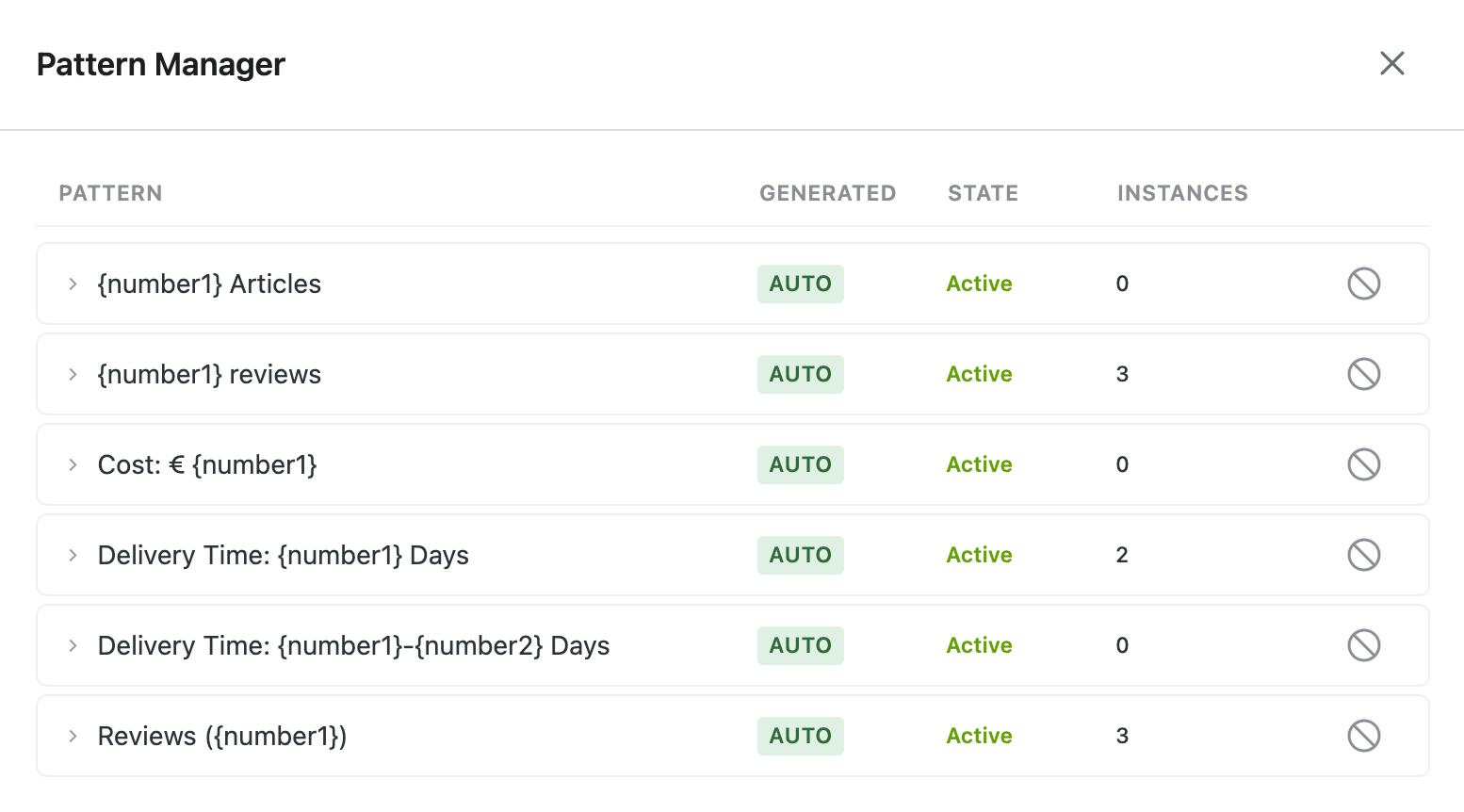
- Glossary for Brand Terms: In Settings → AI Settings, define “Never translate” and “Always translate as” rules for brand names, product names, or slogans, per language. The Glossary is part of the AI Translation Service. (The Pattern Manager is a different tool: it groups repeating strings that differ only by a number, such as “{number1} reviews”.)
- Any Theme and Builder: Omnalingo translates the rendered output, so it works with Enfold, Bricks, Elementor, and WooCommerce without duplicate layouts.
Because Omnalingo uses modern AI language models rather than legacy machine translation, translations can follow context and tone, and you can set a writing voice site-wide and formality (du/Sie) per language.
When You Should Choose Weglot Instead of Omnalingo
We believe in honest software recommendations. Omnalingo is purpose-built for WordPress, but Weglot is a strong product with distinct advantages for specific use cases. You should consider Weglot if your business matches any of these criteria:
- 1. You run a multi-platform website stack: If your company operates WordPress, Shopify, and Webflow sites, Weglot covers all of them under one dashboard. Omnalingo is built strictly for WordPress.
- 2. You want one hosted service for everything: If you would rather not manage anything inside WordPress and prefer a vendor-run dashboard, Weglot’s cloud approach is a legitimate choice.
- 3. You do not control the WordPress setup: If you are an agency working on a client site where installing a plugin is not possible, a hosted service may be the practical option.
If those specific requirements do not apply to you, a native WordPress solution gives you more control over your translations and a more predictable bill.
How to Migrate from Weglot to Omnalingo
If you currently use Weglot and want to move your translations into your own database, the process is straightforward:
- Step 1: Export your custom edits: Log in to your Weglot dashboard and export your translations if you made manual wording adjustments that you wish to preserve. Do this before your plan ends.
- Step 2: Install Omnalingo and run the wizard: Activate Omnalingo on your WordPress site. The setup wizard walks you through Languages, the language Switcher, and the optional License step (a free key with 2,000 AI words, or your AI Translation Service key). Language folders like /de/ are created automatically with pretty permalinks.
- Step 3: Translate your site: Open Translation → Sitemap and use “Enable Auto translate for all” (this needs the AI Translation Service or the free trial words). Or translate manually in the Live Editor, which is always free.
- Step 4: Deactivate Weglot: Remove the Weglot plugin once your Omnalingo translations are in place and checked.
Because Omnalingo uses standard subdirectory URLs, you can keep the same language folder structure, which helps protect your existing search engine rankings. Check your translated slugs and redirects after the switch.
Frequently Asked Questions About Weglot and Omnalingo
What happens to my translations if I cancel Weglot?
Your site will no longer be translated. According to Weglot’s WordPress.org listing, without an active plan the site is no longer translated. Your translations stay on Weglot’s servers and can be exported, so export them before you leave.
Can I keep my translations if I cancel Omnalingo?
Yes, as long as the plugin stays installed. Omnalingo stores translated content in its own tables in your WordPress database. If you stop paying for the AI Translation Service, your existing translations keep being served; only new AI translation stops. If you deactivate the plugin itself, translated pages stop being served, but the data stays in your database.
Does the translation approach affect page speed?
Omnalingo adds under 25ms of load time. Translations are prepared upfront, not on request, with no proxy and no external rendering service. We have not measured Weglot, so we do not claim numbers for it; test both on your own site if speed is critical.
How does Omnalingo handle dynamic content like WooCommerce?
Omnalingo translates the rendered output on your server. Products, cart, checkout, and transactional emails (order emails use the order’s language) are covered, without duplicating posts. Text that only appears after a click needs to be captured once through a scan or the Live Editor. See translating WooCommerce for details.
Ready to own your translations? Explore Omnalingo today or read our complete 2026 multilingual guide to build an international WordPress site that lasts.