For most WordPress sites, choose subdirectories (example.com/de/). They are the simplest to run: one domain, one SSL certificate, one Search Console property. Separate country domains (ccTLDs such as .de or .fr) make sense mainly if you run genuinely separate local businesses, and they mean building each site’s reputation separately. Subdomains add cookie and certificate work without a documented ranking advantage.
Ask ten SEO consultants whether you should use subdirectories, subdomains, or separate country domains (ccTLDs) for your multilingual website, and many will answer: “It depends.” In our experience building and growing WordPress sites, for most businesses the answer is subdirectories. This is our opinion, based on practical experience and on what Google documents, not a guarantee of rankings.
Every time you launch a new language, your URL structure affects how your content is organised, how links flow across your pages, and how much administrative work your team carries. Picking a structure that is hard to maintain means more work on every future language.
Let us look at what each setup means in practice, and what Google itself says.
The 4 Options for Multilingual WordPress URLs
When localizing a WordPress site, you have four technical paths for structuring your international addresses:
- 1. Subdirectories (example.com/de/): Localized pages live in a folder under your primary domain.
- 2. Subdomains (de.example.com): Localized pages sit on a separate subdomain prefix.
- 3. Country Domains (ccTLDs like example.de): Dedicated country-code domains registered with national registries.
- 4. URL Parameters (example.com/?lang=de): A parameter appended to the URL.
Let us dispose of URL parameters first. Google’s guide to multilingual sites recommends using “different URLs for each language version” and lists URL parameters as “Not recommended”, because they make URL-based segmentation difficult. Parameterized URLs are also harder for people to read and share. If a translation plugin only offers URL parameters, think twice.
That leaves the real three-way debate: country domains (ccTLDs), subdomains, or subdirectories.
Country Domains (ccTLDs): When They Make Sense
Agency pitches often make separate country domains sound sophisticated: “German shoppers trust .de, French shoppers love .fr, and British consumers expect .co.uk.” There is something to that: a country domain is a clear geographic signal to both users and search engines. But for most small and mid-sized sites, it also means running several websites instead of one.
1. Each domain builds its reputation separately. A brand-new example.de is a new site. It does not automatically benefit from the links your .com collected over the years. (Note that “domain authority” is a third-party metric, not a Google concept; the point is simply that a new site starts with no links of its own.) To rank in competitive markets, you typically have to earn links and awareness for each country domain again.
2. The administrative overhead is higher. Managing multiple country domains means renewing several registrations, configuring SSL certificates and DNS for each, and sometimes meeting local residency requirements (certain registries require a local presence). If you only want to sell your products in Munich, that is a lot of extra infrastructure.
If you do operate separate local companies with local teams, prices, and legal entities, country domains can be a sound choice. Our advice is aimed at the more common case of one business adding languages.
Subdomains: The Awkward Middle Ground
Some developers choose subdomains (like de.example.com or es.example.com) because they seem like a practical middle ground: no extra domain purchases, but clean separation. In our experience, subdomains bring most of the maintenance of separate sites without the branding benefit of a country domain.
Google lists no ranking penalty for subdomains, and its documentation says that for subdomains “users might not recognize geotargeting from the URL alone”. Whether subdomains and subdirectories rank identically is debated among SEOs, and we do not claim a measured difference. What we can say is that subdomains create practical work for WordPress owners:
- Cookie and session handling: Sharing sessions across subdomains needs cookie configuration. If a customer adds an item to their cart on the English site and switches to German, the cart may not follow without extra setup.
- Certificates and DNS: Each subdomain needs to be covered by your SSL certificate (a wildcard certificate is common) and your DNS and hosting setup.
- Cross-origin issues: Fonts, web components, and third-party scripts can run into Cross-Origin Resource Sharing (CORS) restrictions between subdomains.
On analytics, subdomains are not a blocker: a Google Search Console Domain property covers all subdomains, and Google Analytics can track several subdomains in one property. It just needs to be set up deliberately.
Why Subdirectories Are Our Default Recommendation
This brings us to the option we recommend for most businesses: subdirectories (such as example.com/de/ and example.com/es/).
Subdirectories offer practical advantages that make running a multilingual site easier:
1. Everything lives on one site. A German product page at example.com/de/product/ sits under your existing domain, with the same hosting, the same crawl setup, and the same history. There is no separate site for Google to discover, and in our experience new language folders are picked up quickly through your existing sitemap and internal links. There is no guaranteed timeline for indexing, though.
2. Links point to one site. When a foreign publication links to your French page (example.com/fr/product/), that link points to the same domain as everything else you publish, so you do not have to spread your link-building across several websites.
3. Less infrastructure. One domain name to renew. One SSL certificate. One analytics property. One Search Console Domain property, or a URL-prefix property per language folder if you want separate reports for /de/. Your infrastructure stays lean and easy to maintain.
Comparing All Multilingual URL Structures
Here is how the options compare, based on Google’s documentation and our practical experience:
| Structure | Search considerations | Maintenance Overhead |
|---|---|---|
| Subdirectories (example.com/de/) | One site, one set of links. Easy to manage in Search Console. | Minimal. One domain, one SSL certificate. |
| Subdomains (de.example.com) | No documented penalty, but Google notes users may not recognize geotargeting from the URL alone. | Moderate. Wildcard SSL, cross-subdomain cookies, CORS. |
| Country Domains (ccTLDs like example.de) | Strong geographic signal, but each domain builds its own reputation. | High. Separate domains, DNS, and sometimes local legal presence. |
| URL parameters (?lang=de) | Google lists them as “Not recommended”. | Low, but not advised. |
Whichever structure you choose, give every language version its own URL and connect the versions with reciprocal hreflang tags. (Read our guide on how hreflang works on WordPress.)
Translating Your Slugs: The Optional Extra
Choosing subdirectories is step one. A second decision is whether to translate the URL slugs themselves.
Many plugins stop after adding the language folder. You get URLs like example.com/fr/about-us/ or example.com/de/how-it-works/. Search engines can crawl these pages fine, but translated words make URLs more readable for local visitors. Google’s John Mueller has described URL words as a “very very lightweight” ranking factor, so the benefit is mostly readability and trust, not a ranking boost. We cover the trade-offs in should you translate URL slugs.
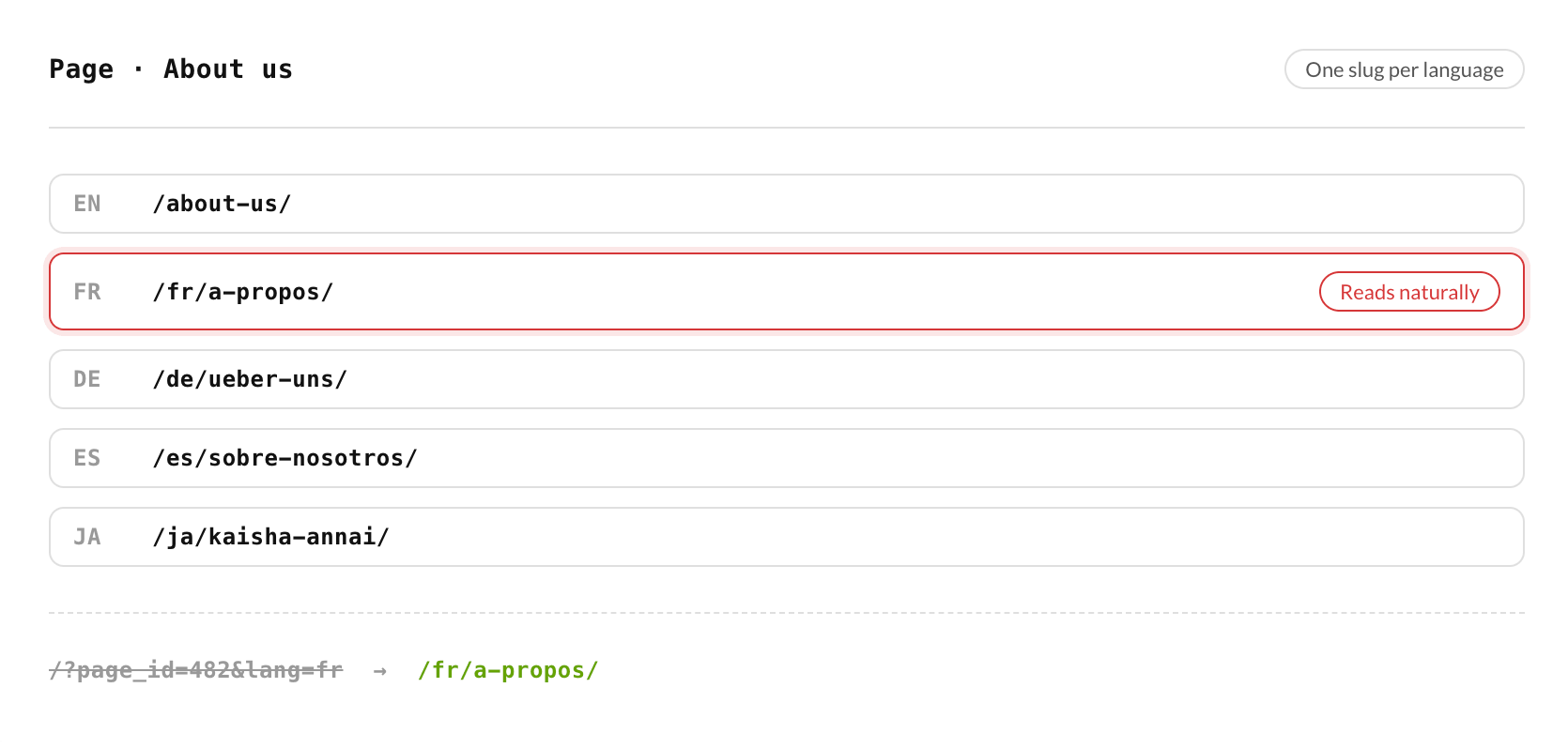
In Omnalingo, you translate a slug per page and language with the Translate URL option (with a live preview and an AI suggestion), and you can bulk-translate URLs for many pages. Needs pretty permalinks. Examples:
- English:
example.com/about-us/ - French:
example.com/fr/a-propos/ - German:
example.com/de/ueber-uns/ - Spanish:
example.com/es/sobre-nosotros/
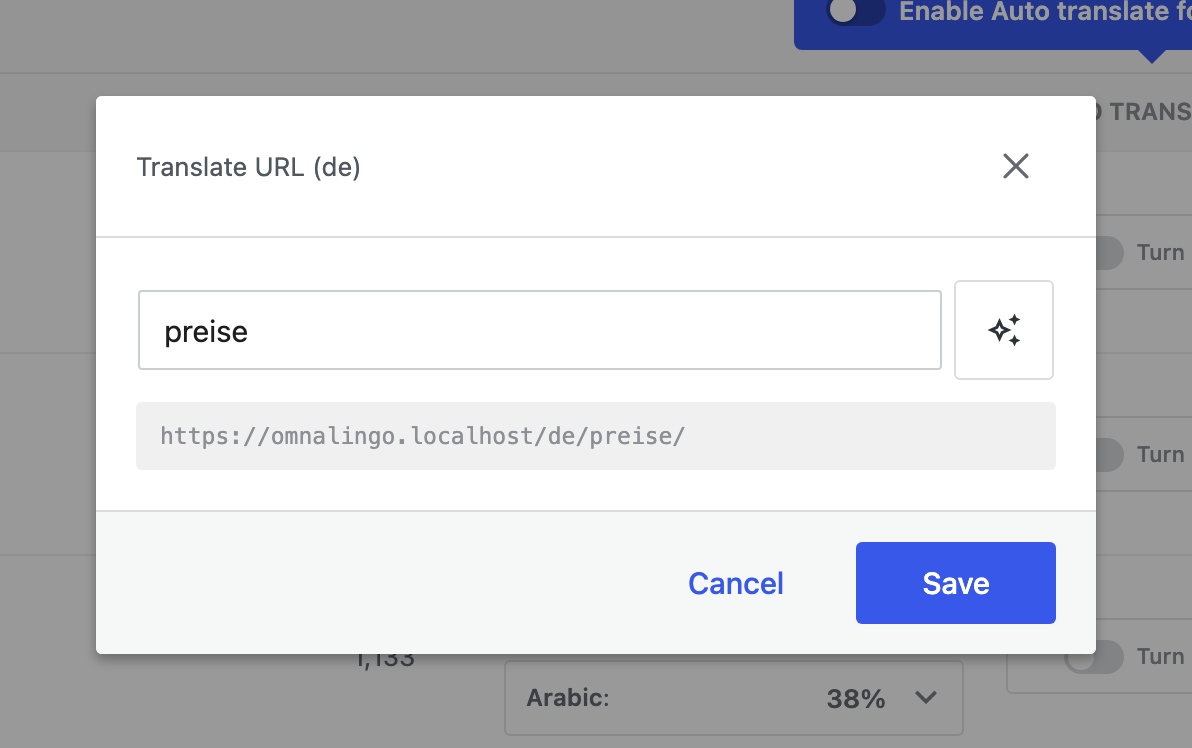
The old slug under the language folder redirects with a 301 to the translated one. Paired with valid reciprocal hreflang tags, Google can show the right language version to the right searchers. (Curious how Google assesses automated content? Read what Google actually says about AI translations).
Frequently Asked Questions About Multilingual URL Structures
Can I switch from subdomains to subdirectories later?
Yes, but plan it as a migration. Switching requires 301 redirects for every translated URL on your site. Google follows 301 redirects, but migrations often cause a temporary period of fluctuation while pages are re-crawled and re-indexed. It is easier to start with subdirectories.
Does Google favor country domains over subdirectories?
Google does not say it does. Its documentation says each language version should have its own URL and recommends hreflang; it also notes that Google detects the language of a page from its visible content, not from the URL. A country domain is a clear geographic signal, but we are not aware of a documented ranking preference for ccTLDs over subdirectories. Subdirectories with good content and hreflang are a fine setup.
Should I translate slug words or keep them in English?
It is optional, and mostly a readability choice. Translated slugs help local visitors recognise the page in search results and in the address bar. As a ranking factor, URL words are described by Google’s John Mueller as “very very lightweight”. If you translate slugs, keep the redirects from the old ones. See our slug guide for details.
Ready to launch clean multilingual subdirectories on WordPress? Try Omnalingo today or explore our complete 2026 multilingual guide to build an international site.