An hreflang tag is simply a digital address label telling search engines which language version of a page belongs to which audience. It tells Google: “If a searcher speaks German, show them this URL; if they speak Spanish, show them that URL.” You should not have to write these tags by hand, but understanding how they work helps you recognize when a plugin setup is broken.
If you have ever opened an SEO audit report or clicked through Google Search Console for a multilingual site, you have probably run into warnings mentioning hreflang. The documentation around it often sounds like an engineering textbook full of ISO codes, alternate links, and XML namespaces. Even experienced SEOs find it one of the fiddlier parts of international SEO.
Here is the secret: the concept behind hreflang is actually remarkably simple. You do not need to be a programmer to understand what it does, why search engines rely on it, and why so many WordPress setups accidentally get it wrong. Consider this your short guide to learning how international indexing works under the hood.
The Quick Explainer: What Does hreflang Actually Do?
Imagine you publish a popular blog post in English. A few months later, you translate that exact same post into German and Spanish. Now you have three separate URLs with the same layout and meaning, but written in different languages.
Without any extra signals, search engine bots have to guess what is going on. Google has to work out on its own which version to show to which searcher.
This is where hreflang steps in. Placed inside your page’s hidden <head> code, an alternate tag tells search engines:
- Equivalence: These three URLs are localized versions of the same piece of content. (Google treats localized versions as duplicates only if the main content stays untranslated.)
- Targeting: Show the
/de/URL to searchers who use Google in German, and show the default URL to everyone else. - Right page, right searcher: hreflang helps Google show the matching language version in the search results. It does not boost rankings by itself.
The Golden Rule: Google Demands a Return Handshake
If hreflang is so straightforward, why do so many websites run into errors? Because Google requires pages to reference each other, which we call the return handshake.
Think of it like an introduction at a dinner party. If your English page points to your Spanish page and says, “This is my Spanish counterpart,” Google wants the other page to confirm it. The Spanish page must return the compliment and point right back to the English page.
| Origin Page | What hreflang Code It Emits | Googlebot’s Verification Reaction |
|---|---|---|
| English Page | Points to /es/ as alternate |
Checks the Spanish page to see if it agrees. |
| Spanish Page (Correct) | Points back to English original | Handshake confirmed. Google can use the tags for both pages. |
| Spanish Page (Missing Return) | Has no alternate link back to English | Handshake rejected. Google ignores the tags. |
Google’s own documentation says it plainly: “If two pages don’t both point to each other, the tags will be ignored.” (Google Search Central, localized versions). A broken handshake means Google may show the wrong language version to searchers.
3 Ways WordPress Plugins Accidentally Break Your Tags
Because nobody writes these tags manually, when hreflang breaks on WordPress, it is almost always caused by a misconfiguration between your plugins, permalinks, and caching layers:
- 1. Pointing to Redirecting URLs: Your hreflang tags should point at the final, indexable URL of each page, with no redirects in between. If a tag points to
example.com/de(without a trailing slash) but your server redirects that toexample.com/de/, the tag points at a URL that is not the page itself, and it is best to fix it. - 2. Canonical Tag Conflicts: A canonical tag tells Google, “This is the authoritative version of this page.” Some poorly configured SEO plugins mistakenly point the canonical tag of translated pages back to the English original. When Google sees an hreflang tag saying “rank this in Spain” right next to a canonical tag saying “ignore this and rank English instead,” Google gets mixed signals, and the translated page may not show up where you want it.
- 3. Aggressive Page Caching: If an over-eager caching plugin saves HTML headers generated for an English visitor and serves that exact cached HTML to a visitor loading the German page, Googlebot can read conflicting signals.
Why You Should Never Edit hreflang Tags Manually
When site owners spot an hreflang error in Search Console, their first instinct is often to install a code-snippet plugin and try writing <link rel="alternate"> tags by hand. Please do not do this.
The math of multilingual tags grows quickly, because every page needs a tag for every language version. If you have 50 pages in 3 languages (your original plus two translations), you have 150 URLs. Each of them must list itself and its two siblings, so that requires generating and maintaining 450 perfectly synchronized link tags. Adding a fourth language raises it to 800.
Add a few new blog posts, change a URL slug, or introduce a fourth language, and keeping those manual tags accurate becomes an impossible full-time chore. A single typo or outdated URL slug breaks the entire return handshake across multiple pages.
How Modern Plugins Handle International Indexing for You
The good news is that you should never have to think about raw tag syntax. A well-built translation plugin handles the international handshake automatically in the background.
When you use a modern WordPress tool like Omnalingo, the system handles the technical heavy lifting without requiring configuration:
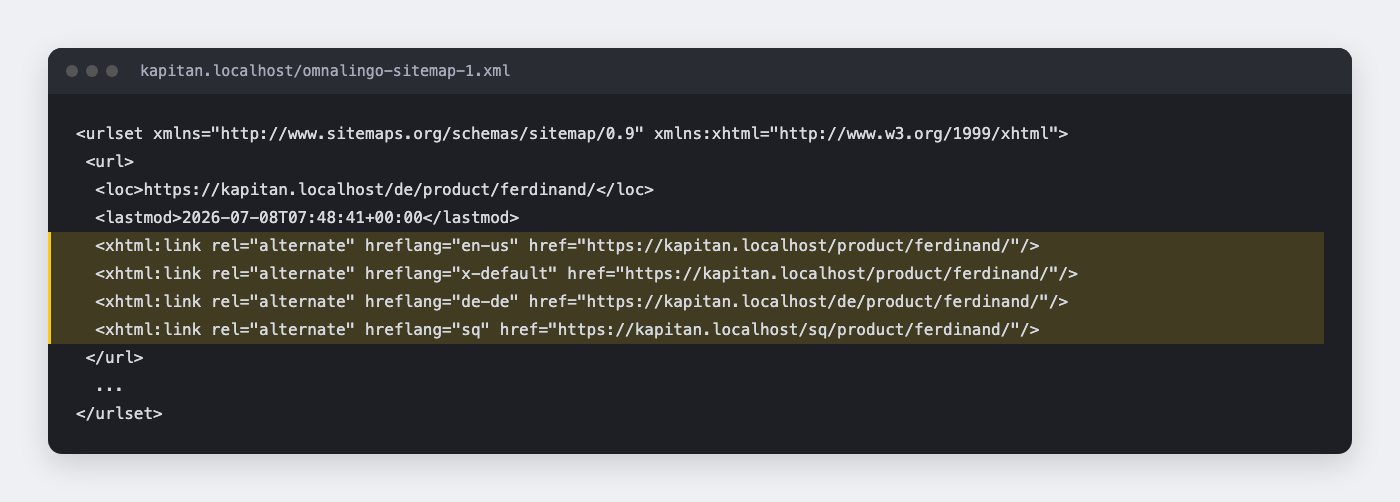
- Automatic Reciprocal Links: Because Omnalingo builds the tags for every language from the same list of translations, the return links are reciprocal by construction. It emits hreflang in the page head and in its XML sitemap (
omnalingo-sitemap-index.xml). - Canonicals that match the language: When a canonical tag exists on a page, Omnalingo rewrites it to the translated URL, so a translated page does not point back at the original.
- Built-in x-default Fallback: The plugin lists your default language as the
x-defaultversion, the fallback for searchers whose language you do not offer. - Server-rendered translations: Translations live in your own database, so search bots read the translated text in the page HTML (read our guide on what Google actually says about AI translations).
Multilingual SEO does not have to be intimidating. Once your plugin handles the underlying handshake, you can focus on what actually moves the needle: publishing great content for your international visitors.
Frequently Asked Questions About WordPress hreflang Tags
Do I need hreflang if I only have one language?
No. If your website is published in a single language, you do not need hreflang tags at all. Standard canonical tags and normal WordPress permalinks are all you need.
Can I check my hreflang tags without paid SEO tools?
Yes, very easily. Open any page in Google Chrome, right-click, and select “View Page Source.” Search for hreflang in the HTML head. You should see a clean list of links pointing to each language version, including the page you are currently viewing. In Google Search Console, the URL Inspection tool and the Page indexing report show whether your translated URLs are indexed.
Does hreflang guarantee Google will rank my translated page?
No, hreflang helps Google pick the right version, it is not a ranking booster. It does not boost a page’s position in the results. What it does is help ensure that when your site does rank, Google serves the correct language to the right visitor. For a complete guide to international ranking factors, read our 2026 multilingual WordPress guide.
Looking for a translation solution that manages international SEO, URL slugs, and clean indexing automatically? Try Omnalingo today and launch a fast multilingual WordPress site. Have questions about setting up your language structure? Reach out to our team through our contact form.